
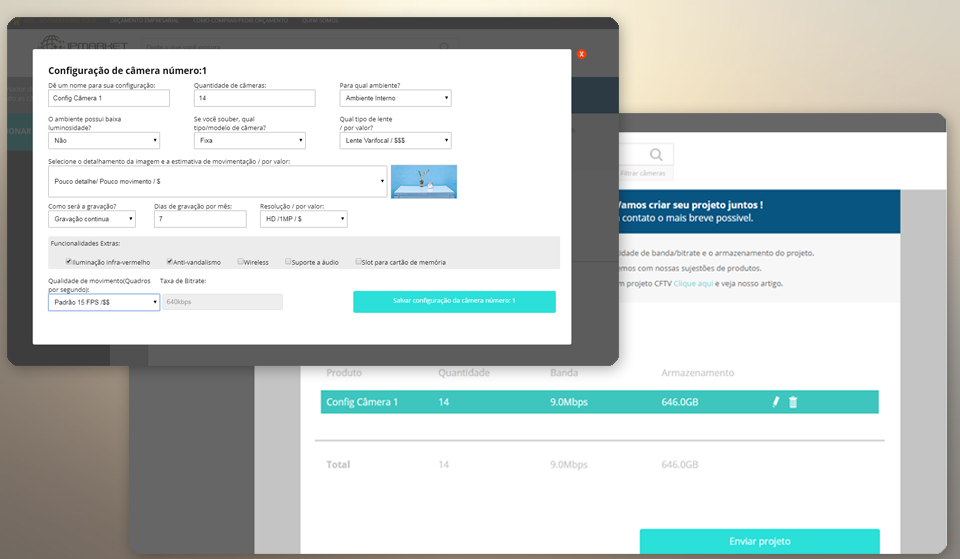
Committed to understanding the true needs of its customers and streamlining processes for prompt service and project development, Sillis, a provider of CCTV and network solutions, has launched a free tool on IPMarket, a B2B CCTV e-commerce platform, allowing customers to configure desired aspects of their projects through camera settings, network traffic calculations, and storage configurations.
How does it work?
The tool functions as a screening process that is sent to Sillis for analysis, which then delivers product recommendations and cost estimates for your project.
Essentially, users can access and create their desired configuration by clicking on “Add New Camera.” The customization options are diverse, and we’ll explain each one:
Configuration Name
In this field, users can add a name to their camera configuration to differentiate which segment this configuration is intended for. For example: Cameras for hallways, Cameras for the parking lot.
Number of Cameras
Here, users must define the approximate number of points where the camera configuration will be installed. If this information is not defined, the user must select at least “1” and inform the Sillis team when sending the project.
*In case of a change in quantity, the bitrate and storage calculations will be affected.
For which environment?
For this field, users must select the type of environment where the camera will be installed, such as indoor settings like homes, businesses, covered parking lots, etc., or outdoor settings like farms, parks, streets, and uncovered parking lots.
Does the environment have low lighting?
Regardless of whether the installation environment is indoor or outdoor, selecting the right camera for a CCTV project requires analyzing whether the light source (natural or artificial) is sufficient for effective image quality. In cases of low lighting, cameras with technologies like Lightfinder or Infrared may be selected during analysis, and the estimated traffic and storage will be adjusted accordingly.
Camera Type/Model?
This field is optional but will assist in the equipment selection process. It contains two types of selection:
The first is “Fixed,” where the positioning of the image to be monitored is defined during installation and manually. By selecting “Fixed,” the user can choose whether the camera lens will be fixed or varifocal.
If the user opts for the “PTZ” option, the selected equipment can be positioned through user management in conjunction with a VMS software.
PTZ stands for “Pan – Tilt – Zoom,” which are the movements performed by this configuration. Additionally, the selector allows the user to choose the Zoom configuration for their PTZ.
Image Detail and Movement Estimation
This selection impacts the camera’s performance and the overall CCTV project configuration. For example, a perimeter with minimal image detail and low movement, such as a medical office reception area, involves less pixel movement and consequently less bitrate transmission.
Today, many IP camera brands use advanced bandwidth-saving technologies, transmitting only the pixels that are modified to your network.
Recording Type and Recording Duration
The type of recording affects the data traffic of a CCTV network. If the recording is continuous, the user should indicate the number of recording days within one month for the monthly storage calculation.
If the recording is done only during movement, it is important to provide an estimate of the movement in the location, for example, 3 hours per day for 20 days a month, so that the data calculation approximates what will be used during the period.
Resolution
This field indicates the quality of the image to be monitored and the field of view opening. A FullHD resolution will have a wider field of view compared to an HD resolution in the same location.
Movement Quality (Frames Per Second) and Bitrate:
We detail the last two fields of the camera configuration in a separate article, which you can view here.
The movement quality is the FPS (frames per second) rate; a higher rate provides more detailed monitoring with smoother movements. Reducing the FPS rate will lower the bitrate, but it will affect the quality of pixel reproduction during video playback.
The bitrate field is not customizable by the user; it will be calculated after all mandatory fields are selected.
By Value:
In some fields, you can see these symbols “($), ($$), ($$$),” which were defined to help users estimate value and functionality, with more dollar signs indicating higher cost.
The Submission
After defining all configurations, users can view the total number of cameras, the amount of bandwidth (transmission), and the total storage of the project on the main dashboard of the tool.
The submission to the project analysis team is done through the button that appears at the bottom of the page called “Submit Project.” The user must fill in their details and, if desired, leave a message with additional information (if applicable).
The IPMarket / Sillis team will perform the analysis and return with all project information, product recommendations, and cost estimates.
You can access the tool by clicking here!


